Refined Jumpchart Navigation.
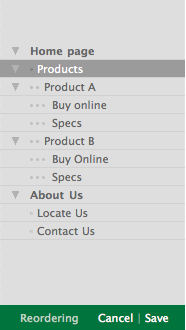 One of the best things about Jumpchart is how easy it is to reorder navigation. It makes laying out the structure for a website flexible- not to mention it’s client friendly.
We’ve made a few tweaks, and implemented our recent lucid revelation.
You can now:
Expand and collapse sub-sections, which becomes really crucial and productive when dealing with larger projects.
Use the new visual dots to the left of the nav to more easily denote hierarchal level. Also extremely helpful for larger, more complex projects.
Use the modal approach to reorder. Instead of having the always-present reorder handle, you now click on the “Reordering” button, work your magic, and hit save. This is nice because now there’s the the option to go back in the event of a (gasp) mistake. If you’re continually playing with the structure of a site, then wishing you could “undo” the last three moves… it gets tough to remember exact previous placement. No more worries- now you don’t have to.
For more detailed information, check out this article.
