Archive for the ‘Staction’ Category

Staction: After the Job is Done.

Joe 08/27/10
Staction

Occasionally we publish support emails on the blog. Usually if one person asks, – more people want to know, but just haven’t asked yet.

QUESTION: (referring to the boss)”...The time entry feature will be great for us, but he will want to know if can it be integrated into his billing process. Basically, does it have the ability to go beyond project communication and management to reporting and billing?”

ANSWER:
I think a lot of this answer depends on your particular workflow, and tools. Here are a few random thoughts that might help:

Keep Reading

Making Sessions Smarter

Staction SessionsStaction is built in PHP. For all it’s occasional syntax weirdness, it is an amazingly flexible and liberating language. PHP does so many things incredibly well, and we’re big fans.

One thing however that it’s not so great at (in our opinion) is session management. The default garbage collector from PHP isn’t perfect, and consistently removes session files that it shouldn’t, almost totally ignoring whatever setting you have for expiration time. It’s frustrating for us, and often causes untimely logouts for our users.

A few weeks ago we started working on a bespoke database driven session system for Staction. The first part came together much easier, and better than we expected. But we still had a problem. After launching the new programming on our dev server we were still getting booted and timed out. Or more to the point, I(Joe) was still getting booted out.

I’m a long time Safari user, and Brian, who was working on the programming, is on the Chrome side of life. Not everyone here was having the problem on Safari, so we started thinking maybe it was just me. After resetting Safari totally, the problem still persisted. Brian, who had also started using Safari as a daily browser for testing, started experiencing the problems, too.

Lots of research, and trial-and-error later we wound up here: http://discussions.apple.com/thread.jspa?messageID=12078357 -10 pages long of people with the exact same problem. Safari occasionally, and arbitrarily sends a new HTTP header without any session information. So after our WTF moment, we started thinking of a workaround.

After a couple other ideas that were non-starters, now once in every 50 calls (approx.) we regenerate the session data, duplicating it into a new session, wiping out the old data and sending the browser a new cookie.

We’re incredibly happy to tell you that since making that change we haven’t been logged out once on our dev server. On Safari, or any other browser.

This morning we pushed out the new session management programming to all Staction accounts. We hope to push it to all the other apps in the next couple weeks.

As we always like to learn from an experience, here are our takeaways:

  • Don’t always assume the problem is with what you’re doing. Check external factors too.
  • When you start to work on solving a problem, be prepared for the problem to evolve as you learn more about it.
  • Make time for solving the little problems with your app. There is nothing glamorous or exciting about improving our session management programming. We can’t say “With sessions that actually keep you logged on!” on our sales site. But we think improving the foundations for these things helps make the app more satisfactory to use. You’ve got to do them, even if it would be more fun to work on email-in on Paprika, or new Jumpchart import/export features.

Input from a User.

We recently received the following e-mail from a curious user about how we, and other people use Paprika:

“I’ve been a staction user for a while now, and I started to “get” the flow of using staction after a few days. Keep Reading

The All-New Staction Web App.

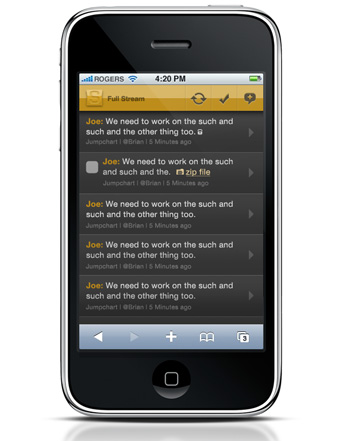
By far our most requested feature on Staction has been an iPhone optimized version. I think a lot of users may have just considered us obstinate for not having one sooner. It seems like such a small thing to do… Shrink the interface, and call it good.

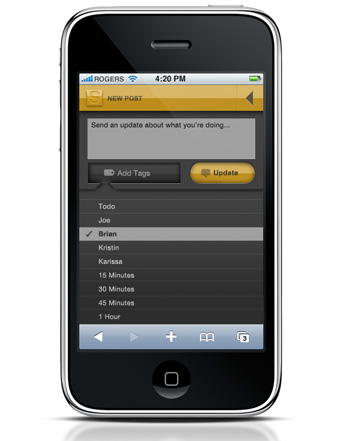
Unfortunately, we had a big problem. The Staction website is designed to be used with a keyboard. The whole application is built around using the mouse as little as possible. But on the iPhone the keyboard is, well, small. Using a tiny keyboard to bang out tags, and a clunky half-visible auto-completer just wasn’t the experience we wanted to give our users. It wasn’t the experience we wanted for ourselves… It just wasn’t great, – believe us, we tried it.

After lots of experimenting, eventually we realized we had to rely on touching and scrolling for tag input. Like with lots of ideas, -it seems quite obvious looking back.

As of Today

As of today, all of our paid accounts have access to the Staction web app. Simply visit your normal account URL, and you’ll be directed to the optimized site. (You can still access the regular site if you like.)

Once logged in, you’ll have access to all the most commonly used features of Staction. Creating todos, logging time, and keeping up with your teammates.

Make sure to tap “+” and add Staction to your home screen, – it works really well that way.

If you want to see the web app, but don’t have an iPhone, iPod Touch, or iPad you can visit your normal account URL and add a /m at the end like this:

http://accountname.staction.com/m

We think you’re really going to like the web app experience. In some ways it’s the best Staction experience yet.

Why Not the Free Account?

We’re going to be honest in a way that I don’t think most companies would. We really hope that the web app drives upgrades for us. By far the biggest portion of Staction users are on the free account. It seems that when we created our plans for Staction, we gave away too much on the low end.

It’s no problem, -we’re happy to have our users, on any account that fits their needs. But we do have to make money to keep our jobs!

Talking over the problem, we came up with a plan that we hope will make sense to you. As we add new features to our apps, you’ll probably see most of them added only to the paid accounts at first. As we recoup the cost of our development time through the upgrades that the features drive, we hope to trickle the features down to the free accounts as well.

We’re hoping this is a sustainable system that can keep everyone happy. Paid accounts just get the features a bit sooner than everyone else. We hope you’ll think it makes as much sense as we do.

Saved Views: A Definitive Guide.

Paste Interactive 12/07/09
Paste, Staction

When we built Staction we decided that all information should be flat. One single long linear line of posts. No hierarchy, no clicking to get to nested folders of information. It’s the simplest paradigm of navigation, and everyone gets it instantly.

But this left us with a problem. How do you see groups of related posts that occurred at different times on the same screen? The project tags that are at the heart of Staction were the first step, but we thought we could push it further. Keep Reading

How We Use Staction. A Pseudo Case Study.

Joe 12/03/09
Staction

A few days ago a (potential) customer asked if we had a case study on how we use Staction. While we’re not sure this qualifies as a case study, we thought we could provide some insight as to how Staction helps in the everyday work life at Paste. Keep Reading

Skip the Mouse.

Paste Interactive 11/19/09
Jumpchart, Paste, Staction

If you’ve used Staction, you probably know we’re keyboard people. The mouse is great, but nothing flies quite as fast as our fingers on a keyboard. If you work in the web-dev industry, you probably feel the same. 

Outside of design related tasks, there’s very little that can be achieved with a mouse that can’t be achieved (usually faster) with a keyboard. Knowing your key commands improves the speed and fluency of interacting with your computer.

On that note, we thought we would share some of our favorite indispensable key commands. We bet you know a lot of them- but we also bet you don’t know all of them. So for the 5 seconds a day, 2.5 minutes a month, and 30.4 minutes a year we just saved you, you are most assuredly welcome.  Keep Reading

Staction Quick Tip: Private Conversations.

Paste Interactive 11/12/09
Paste, Staction

sm-stIn Staction, get straight to the point and communicate directly with the person you need. By typing a name in the meta-information box, you’ll keep the conversation between you and whomever you specify, cutting through the general workflow talk.

Staction Gets Outside the Browser: Part 2.

Paste Interactive 11/05/09
Paste, Staction

stwidget-230x300Last week we announced the all new Staction AIR app. It was the first of many apps that we hope are built by us, and others using the Staction API.

Today we’re excited all over again to announce the Staction widget for the Mac OSX Dashboard.

Learn more about the new widget, and download it here.

Staction Gets Outside the Browser.

Paste Interactive 10/29/09
Paste, Staction

stairWhen we built Staction we imagined it as a format and a platform as well as an app. The simple tagging system begs to be extended outside of the bowser.

The first step towards that goal was the Staction API. The second step was built from the first, and we’re very happy to announce it today: The Staction AIR app.

Now Staction can live on your desktop, outside of your browser. The app encompasses all the most important features of the Staction web app, as well as some desktop class features like keyboard shortcuts, and update notifications that we’re very excited for you to try out.

We hope this is only the first of many new ways to access your Staction account via the API. We’re working internally and with outside developers to make sure that we push the Staction experience as far as possible…

Learn more and download the Staction AIR app here.

Paste Interactive is a small app studio that makes cool, smart tools to help next generation workers work better, simpler, and faster.
Follow us on Twitter
  • Starting on the most major project we've tackled since... probably ever.
  • @markofrespect Got it. While we don't have that (yet) you could export the HTML, apply your own CSS, then share that with the client.
  • @markofrespect (Great to hear) In what way do you want to customize it more? Layout?