Peel. Stick. Rip. StickTo’s and Done.
 Ever wish you could get a little more organization inside your Moleskine? I mean, they’re already small, portable, and sleek looking- all great things. But our thoughts can be all over the place, and our note-taking shows it. We found ourselves drawing all over our notebooks in an attempt to become more organized… and ended up being the exact opposite.
We fixed our own problem… then decided it might be useful to other people, too!
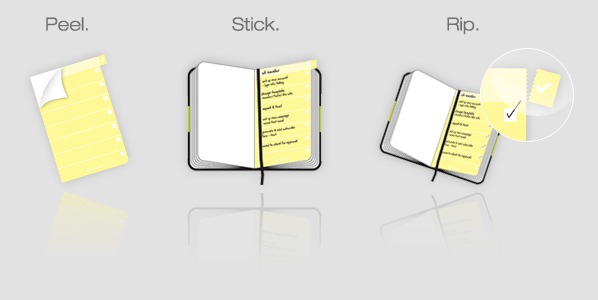
We came up with an experiment to incorporate our todo lists into that same Moleskine pocket notebook we carry around all the time anyway. All you do is peel and stick the StickTo right onto the page, write your todos, and check ‘em off as you go. Instant organization. There’s even a tab that sticks out to remind you you’re not quite done with your list yet. No worries, though- when you are done, you can just rip off that tab and get on with it.
When most of our organization happens online, it’s nice to have a tangible reminder that our physical lives can be just as put together.
